What is Minecraft Classic?
Minecraft Classic represents the humble beginnings of what would become one of the most influential video games in history. Released by Mojang to celebrate the game's 10th anniversary, this browser-based edition captures the pure essence of creative sandbox gameplay that made the original so beloved.
In Minecraft Classic, players are transported to a procedurally generated world composed entirely of distinct blocks. The game strips away complex mechanics and survival elements, focusing purely on the joy of creation. Whether you're constructing towering castles, intricate underground tunnel systems, or simply reshaping the landscape to your liking, Minecraft Classic offers unlimited creative freedom with no restrictions.
The charm of Minecraft Classic lies in its simplicity. There are no health bars to monitor, no hostile creatures to defend against, and no resources to gather painstakingly. Instead, you have immediate access to every block type in the game, allowing your imagination to flow directly into your creations without interruption.
Why Minecraft Classic is So Popular
The enduring popularity of Minecraft Classic stems from its accessibility and nostalgic appeal. Players who experienced the early days of Minecraft can revisit the game in its most original form, while newcomers can understand what made this blocky world so captivating without any learning curve.
Unlike modern versions that require downloads, installations, and powerful hardware, Minecraft Classic runs directly in any web browser. This universal accessibility means anyone with an internet connection can jump in and start building within seconds.
The History Behind Minecraft Classic
Minecraft began as a passion project by Markus "Notch" Persson in 2009. The game evolved rapidly from its initial release, gaining features, complexity, and a massive following. By 2019, when Minecraft Classic was released as a free browser game, the franchise had sold over 150 million copies worldwide.
The Classic version specifically recreates the 2009 creative mode experience, complete with the limited block selection and simplified mechanics of that era. It serves as both a historical artifact and a reminder that great gameplay doesn't require cutting-edge graphics or complex systems.
How to Play Minecraft Classic
Minecraft Classic offers an intuitive building experience that anyone can pick up and enjoy. The game places you in a randomly generated world where your only objective is to create and explore at your own pace.
Basic Controls in Minecraft Classic
Use an unordered list to explain the controls:
- WASD Keys: Move your character forward, backward, and side-to-side through the world
- Space Bar: Jump to reach higher places or clear small obstacles
- Mouse Movement: Look around the environment in a full 360-degree view
- Left Click: Mine or destroy blocks to clear space or gather materials
- Right Click: Place blocks from your selected inventory slot
- Number Keys (1-9): Quickly select different block types from your hotbar
- E Key: Open your full inventory to see all available blocks
How to Get Started with Minecraft Classic
Use an unordered list to explain the gameplay steps:
- Spawn into the world and take a moment to look around your starting location
- Press E to open your inventory and see the variety of blocks available
- Select a block type using number keys 1-9
- Right-click on the ground or existing blocks to start building your first structure
- Left-click to remove any blocks you want to change or clear space
- Explore the infinite world by walking in any direction to find interesting terrain
Advanced Techniques for Minecraft Classic
Use an unordered list for advanced tips:
- Build multi-story structures by creating staircases or ladders with blocks
- Create underground bases by mining deep and hollowing out caverns
- Use different block types to create patterns and textures in your builds
- Terraform the landscape by removing hills or filling valleys to suit your vision
- Build bridges to connect distant structures across water or ravines
Minecraft Classic Features
Gameplay Mechanics
Minecraft Classic operates on a simple but powerful premise: every element in the world is a block that can be interacted with. This block-based system creates endless possibilities for construction and creativity. The game world generates infinitely in all directions, meaning you'll never run out of space to build.
The physics in Minecraft Classic are straightforward. Blocks float in place when placed, allowing for impossible architectural feats like floating islands and sky bridges. Water and lava blocks flow according to simple rules, adding dynamic elements to your creations.
Visual and Audio Design
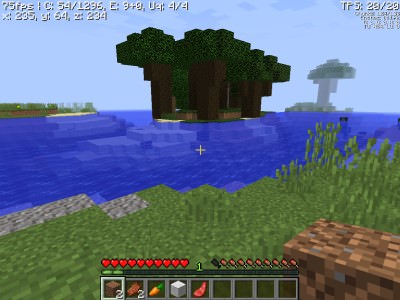
The iconic pixelated aesthetic of Minecraft Classic has become instantly recognizable worldwide. Each block features a distinct texture that makes identification easy while maintaining a cohesive visual style. The simple color palette and low-resolution graphics have aged remarkably well, giving the game a timeless charm.
Sound design in Minecraft Classic is minimal but effective. The gentle background music creates a relaxing atmosphere perfect for extended building sessions. Block placement and destruction provide satisfying audio feedback, making the act of creation feel tactile and rewarding.
Progression System
Unlike modern Minecraft versions, Minecraft Classic has no formal progression system. There are no achievements to unlock, no levels to gain, and no equipment to upgrade. This design choice reinforces the game's focus on pure creativity rather than goal-oriented gameplay.
Your progression in Minecraft Classic is measured entirely by your creations. Each structure you build represents your growing skill and imagination. The game saves your world automatically, allowing you to return and continue expanding your projects indefinitely.
Tips and Tricks for Minecraft Classic
Beginner Tips
- Start with a simple shelter to establish your presence in the world before ambitious projects
- Experiment with different block combinations to discover visually appealing patterns
- Use the terrain to your advantage by incorporating natural hills and caves into your designs
- Build tall towers or distinctive landmarks to help navigate the infinite world
- Try creating underground structures for a completely different building experience
Advanced Strategies
- Plan large projects by starting with a foundation and working upward systematically
- Create themed areas in your world, such as medieval castles or modern cities
- Use water and lava creatively to add fountains, moats, or dramatic lighting effects
- Build collaborative projects by inviting friends to join your session
- Challenge yourself by recreating real-world landmarks or fictional structures
Why You Should Play Minecraft Classic
Minecraft Classic offers a unique gaming experience that stands apart from both modern Minecraft and other building games. Its browser-based nature makes it the perfect choice for quick creative sessions during breaks or whenever inspiration strikes.
The game appeals to players of all ages and skill levels. Children enjoy the simple, intuitive building mechanics, while adults appreciate the meditative quality of creating something from nothing. There's no pressure, no competition, and no way to fail—only the satisfaction of watching your ideas take shape block by block.
Perfect for All Skill Levels
Whether you're a seasoned Minecraft veteran or completely new to the franchise, Minecraft Classic welcomes you. The simplified controls and unlimited resources mean you can focus entirely on the creative process without worrying about survival mechanics or complex crafting recipes.
The game also serves as an excellent introduction to Minecraft's core concepts. Players who enjoy Classic may find themselves curious about the full game's survival mode, redstone mechanics, and endless additional features.
Free to Play in Your Browser
One of Minecraft Classic's greatest strengths is its accessibility. There's no cost to play, no account required, and no software to install. Simply visit the website, and you're immediately transported to your own private sandbox world.
This accessibility makes Minecraft Classic perfect for schools, libraries, or any environment where software installation isn't possible. It's also ideal for sharing with friends—just send them the link, and they can join your creative session instantly.
Frequently Asked Questions About Minecraft Classic
Is Minecraft Classic free to play?
Yes, Minecraft Classic is completely free to play in your web browser. Mojang released it as a celebration of Minecraft's history, making it accessible to everyone without any purchase required.
Can I play Minecraft Classic on mobile devices?
Minecraft Classic is designed primarily for desktop browsers with keyboard and mouse controls. While it may be possible to access the page on mobile devices, the control scheme is optimized for keyboard input.
Do I need to download anything to play Minecraft Classic?
No downloads are required. Minecraft Classic runs entirely in your web browser using standard web technologies. Simply navigate to the official website and start playing immediately.
Is Minecraft Classic suitable for all ages?
Absolutely. Minecraft Classic contains no violence, no scary content, and no complex mechanics that might frustrate younger players. It's widely considered appropriate for players of all ages.
How can I improve at Minecraft Classic quickly?
The best way to improve is simply to build regularly and experiment with different techniques. Try recreating structures you see in real life, study architectural principles, and don't be afraid to tear down and rebuild sections you're not satisfied with.