What is Paper Minecraft?
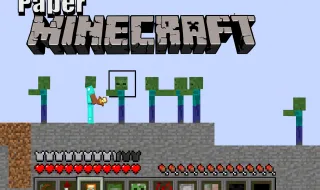
Paper Minecraft is a browser-based 2D side-scrolling game that reimagines the classic Minecraft experience in a flat, paper-styled world. Developed by Griffpatch, this game takes the core mechanics that made Minecraft so popular—exploration, resource gathering, crafting, and building—and adapts them for a 2D plane similar to games like Terraria. Players can explore procedurally generated worlds, mine resources, craft tools and weapons, and build structures limited only by their imagination. The game offers three distinct modes: Creative, where resources are unlimited and flying is enabled; Survival, where players must manage health, hunger, and hostile mobs; and Peaceful, a relaxed version of Survival without threats. Everything runs directly in your web browser with no downloads required, making it incredibly accessible for anyone who wants to experience a Minecraft-style adventure without installing anything.
Why Paper Minecraft is So Popular
The popularity of Paper Minecraft stems from its faithful recreation of Minecraft's satisfying gameplay loop in a completely different visual format. Players who love the crafting and building aspects of Minecraft can enjoy them here without the complexity of 3D navigation. The game captures that same addictive quality where you tell yourself "just one more night" only to realize hours have passed while building the perfect base. The 2D perspective actually makes certain activities more approachable—you can see your entire base at once, plan structures more easily, and navigate without getting lost in complex builds. For Minecraft fans looking for a fresh take, or for newcomers curious about sandbox survival games, this provides an excellent entry point. The controls feel responsive, the world generation creates interesting terrain to explore, and the satisfaction of gathering rare materials or successfully surviving your first hostile night keeps players coming back.
The History Behind Paper Minecraft
Griffpatch created Paper Minecraft as a tribute to the Minecraft franchise, bringing its sandbox mechanics into a 2D format that works well in browser-based environments. The game emerged from the Scratch community, where many developers create fan tributes and reimaginings of popular games. Since its release, it has become one of the most popular browser-based Minecraft alternatives, attracting players who enjoy the genre but prefer the simplicity of 2D gameplay. The developer has continued updating the game, adding new features like additional biomes, items, and quality-of-life improvements over time. This ongoing development has helped the game maintain its player base and stay relevant among browser-based gaming options.
How to Play Paper Minecraft
Understanding the basics of Paper Minecraft is straightforward, but mastering its systems takes time and practice. The game captures the essence of survival and creative gameplay in a format that's easier to grasp than full 3D Minecraft while still offering meaningful depth. Whether you're breaking blocks to gather resources, crafting tools at a workbench, or building elaborate structures, the mechanics feel intuitive and rewarding. The controls are designed to be accessible for most players, though learning all the shortcuts and advanced techniques will significantly improve your experience.
Basic Controls in Paper Minecraft
- W / Up Arrow: Jump to reach higher ground or clear obstacles
- A / D / Left / Right Arrow: Move your character left and right
- R: Sprint when moving on land or swim when in water
- Left-Click: Break blocks when holding the cursor, or place blocks when in build mode
- Number Keys 1-9: Select different items from your hotbar for quick access
- E: Open your inventory, interact with chests, or access crafting stations
- F: Consume food to restore hunger or use items
- Q: Drop items from your inventory
- Space (mid-air): Glide using Elytra wings when equipped
- Z: Raise your shield to block incoming attacks
How to Get Started with Paper Minecraft
- Choose your character skin from the available options before generating your world
- Select your preferred world type and game mode (Creative, Survival, or Peaceful)
- Begin in Survival mode by punching trees to gather wood blocks for basic tools
- Craft a workbench early on to access better tools and recipes
- Build a shelter before nightfall to protect yourself from hostile mobs
Advanced Techniques for Paper Minecraft
- Press O regularly to save your game progress and avoid losing work
- Use torches strategically in caves and dark areas to prevent hostile mob spawns
- Create wheat farms for sustainable food production in Survival mode
- Mine diagonally to cover more ground and find resources faster
- Set spawn points with beds to respawn safely after dying
Paper Minecraft Features
Gameplay Mechanics
Paper Minecraft includes a comprehensive crafting system that mirrors many aspects of the original game's progression. Players gather materials like wood, stone, iron, gold, and diamonds to craft increasingly powerful tools and weapons. The mining system works similarly to Minecraft—you break blocks to collect resources, with harder materials requiring better tools. The game features various biomes including forests, deserts, mountains, and caves, each containing different resources and environmental challenges. Combat involves melee weapons and bows, with hostile mobs like zombies and skeletons spawning at night or in dark areas. Hunger management adds a survival element in Survival mode, requiring players to farm or hunt for food to maintain their health. The day and night cycle affects gameplay significantly, as darkness brings danger while daylight offers safe exploration and building opportunities.
Visual and Audio Design
The graphics in Paper Minecraft have a distinctive paper-craft aesthetic that gives the game its unique charm. Blocks have a hand-drawn quality with visible outlines that make them look like paper cutouts, which actually makes gameplay easier since you can clearly distinguish between different block types. The color palette is bright and friendly, making long play sessions comfortable on the eyes. Sound effects are simple but effective—block breaking sounds are satisfying, and ambient sounds help create atmosphere during night sequences. The UI is clean and minimal, showing essential information like health, hunger, and hotbar without cluttering the screen. Character movement has a smooth animation style that makes running, jumping, and swimming feel natural.
Progression System
Progress in Paper Minecraft follows a familiar pattern of gathering, crafting, and building. New players start with nothing and must gather basic materials before they can craft meaningful tools. The progression from wooden tools to diamond equipment provides a satisfying sense of advancement as your character's capabilities improve. Building projects can range from simple wooden shelters to elaborate pixel art creations or massive structures. Achievements track various milestones, giving players additional goals beyond basic survival. The game rewards both creative expression and skilled survival play, meaning there's always something to work toward regardless of which mode you're playing.
Tips and Tricks for Paper Minecraft
Beginner Tips
- Punch trees immediately upon spawning to gather wood for basic crafting
- Craft a bed as soon as possible to skip dangerous nights
- Always carry torches when exploring caves to prevent mob spawns
- Build your first base near water and trees for easy resource access
- Save frequently using the O key to prevent progress loss
Advanced Strategies
- Create automated farms for wheat and other renewable resources
- Dig strategic tunnels to explore underground areas safely
- Use shields in combat to reduce damage from hostile mobs significantly
- Explore ocean biomes for unique resources like prismarine
- Plan large builds on graph paper first to ensure proper proportions
Why You Should Play Paper Minecraft
Paper Minecraft succeeds as both a tribute to Minecraft and a standalone game worth playing on its own merits. The 2D format doesn't feel like a compromise—instead, it offers a different kind of satisfaction that focuses on creative expression and strategic survival without the navigation challenges of 3D environments. I find it particularly appealing as a game you can pick up for quick sessions or lose yourself in for extended periods, depending on what you're in the mood for. The browser-based nature means you can play it almost anywhere, whether you're on a break at work or relaxing at home. For Minecraft enthusiasts, this provides a fresh perspective on familiar mechanics. For newcomers, it's an accessible introduction to sandbox survival games that doesn't require any technical knowledge or software installation.
Perfect for All Skill Levels
The game accommodates players of all experience levels through its three distinct modes. Beginners can start with Peaceful mode to learn mechanics without pressure, while experienced players can challenge themselves in Survival mode with hostile mobs and resource management. Creative mode allows players who just want to build without constraints to do exactly that, making it perfect for creative expression regardless of gaming background. The controls are simple enough for young players to learn quickly while offering enough depth for seasoned gamers to appreciate the nuances.
Free to Play in Your Browser
One of the biggest advantages of Paper Minecraft is how accessible it is. You don't need to create an account, download files, or install anything—just open the game in your browser and start playing. This makes it ideal for playing on computers that don't allow software installation or for situations where you want a quick gaming session without commitment. The instant accessibility hasn't compromised the quality of the experience, which remains surprisingly polished for a browser game.
Frequently Asked Questions About Paper Minecraft
Is Paper Minecraft free to play?
Yes, Paper Minecraft is completely free to play directly in your web browser with no hidden costs or premium features.
Can I play Paper Minecraft on mobile devices?
Paper Minecraft is designed primarily for desktop browsers, but some browsers on tablets with keyboard support may allow limited play.
Do I need to download anything to play Paper Minecraft?
No downloads are required. The entire game runs in your web browser, though you should ensure your browser is up to date for the best experience.
How can I improve at Paper Minecraft quickly?
Focus on learning the crafting recipes early, practice efficient resource gathering, and always prepare for nightfall by having shelter and torches ready.
What makes Paper Minecraft different from similar games?
Paper Minecraft combines Minecraft's beloved sandbox mechanics with 2D side-scrolling gameplay, creating a unique experience that feels familiar yet distinctly different from both Minecraft and other 2D sandbox games.