What is Mini Golf 3D?
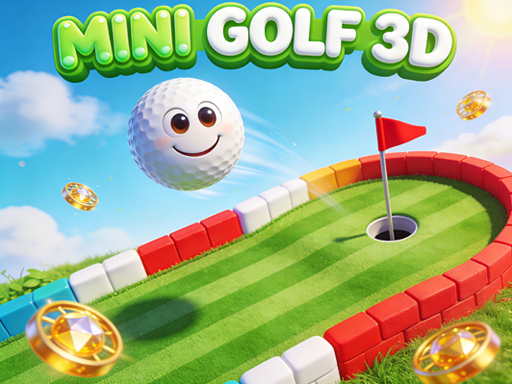
Mini Golf 3D is a browser-based casual sports game that captures the fun and frustration of real mini golf in a colorful digital format. The game drops you into over 40 unique courses, each designed with its own layout, obstacles, and challenges. Your goal is simple: sink your ball in the hole using as few strokes as possible.
What makes this version stand out is how it takes a familiar concept and wraps it in satisfying 3D graphics and physics that feel right. The ball rolls the way you expect it to, bounces off walls realistically, and responds to different surfaces like sand and water in ways that make sense. You don't need any special skills to start playing, but mastering the game takes practice and patience.
The developers at Mapi Games built this title with accessibility in mind. Whether you're on a lunch break, waiting for an appointment, or just want something relaxing to do at home, Mini Golf 3D fits those moments perfectly. It's the kind of game you can pick up for five minutes or spend an hour working through course after course.
Why Mini Golf 3D Is So Popular
The popularity of Mini Golf 3D comes down to a few key factors. First, the gameplay loop is incredibly satisfying. Each shot involves a moment of planning, execution, and then watching the result unfold. When your ball bounces off a wall exactly as you intended and drops into the hole, it feels good. When it doesn't, you immediately want to try again.
Second, the difficulty curve works well. Early levels ease you in, but later courses introduce sand traps, water hazards, and tricky angles that require genuine skill to navigate. This progression keeps the game interesting without making you feel overwhelmed. You can always see improvement in your performance, which is a big part of what makes casual games addictive.
The History Behind Mini Golf 3D
Mini Golf 3D emerged as part of a wave of browser-based casual games that became popular in the late 2010s and early 2020s. Developers realized that players wanted games they could play instantly without downloads or installations, and the web platform made this possible. Mapi Games focused on creating polished mini golf experiences that ran smoothly in browsers while still delivering the depth that players expected.
The game has evolved through various updates, with new levels added and physics refined over time. This ongoing development has kept the player base engaged and attracted new players looking for a quick gaming fix.
How to Play Mini Golf 3D
Playing Mini Golf 3D requires you to understand the basic mechanics of aiming, power control, and shot execution. The game uses a simple drag-to-aim system that makes shooting intuitive once you get the hang of it. Each course presents a par score, and your objective is to complete the hole in that number of strokes or fewer.
Basic Controls in Mini Golf 3D
- Aiming: Click and drag from your ball to set the direction of your shot. The farther you drag, the more power you'll apply.
- Power: The distance between your ball and your cursor determines shot strength. Pull back further for stronger shots, keep it close for gentle rolls.
- Shooting: Release the mouse button to take your shot. The ball will travel in the direction you aimed with the power you set.
- Camera: You can rotate the view in some levels to see different angles of the course, helping you plan your approach.
How to Get Started with Mini Golf 3D
- Launch the game in your web browser. The main menu will appear with options to start a new game or continue a saved game.
- Select your first course from the level selection screen. Courses are numbered, and you typically start at level one.
- Position your aim by clicking and dragging from the ball. Watch the power indicator that appears.
- Release to take your shot and watch the ball travel across the course.
- Continue shooting until you sink the ball in the hole. Your total strokes will be recorded against the par for that hole.
- Complete all holes in a course to finish that level and unlock the next one.
Advanced Techniques for Mini Golf 3D
- Bank Shots: Use the walls strategically to bounce your ball around obstacles. Sometimes the longest path around is actually the shortest path to the hole.
- Power Control: Practice finding the sweet spot for power. Overpowered shots often overshoot the hole or send your ball into hazards.
- Reading Surfaces: Sand traps slow your ball dramatically, while water hazards add penalty strokes. Learn to avoid these or use them strategically.
- Course Memory: Once you've played a level, remember where the tricky spots are and plan accordingly on future attempts.
Mini Golf 3D Features
The game comes packed with features that add depth and replay value beyond just completing courses. These elements work together to create an experience that stays fresh even after playing for extended periods.
Gameplay Mechanics
The physics system in Mini Golf 3D handles ball movement in a way that feels natural and predictable. When your ball hits a wall, it bounces at an angle that makes sense based on where it struck. When it rolls onto sand, it noticeably slows down. Water hazards stop your ball and add a stroke penalty, forcing you to restart from the previous position.
Each course has a par rating that reflects the expected number of strokes for skilled play. Beating par feels rewarding, but even completing a difficult hole in a reasonable number of strokes provides satisfaction. The gem collection system scattered throughout courses adds another layer of challenge for players who want to fully master each level.
Visual and Audio Design
The graphics in Mini Golf 3D are clean and colorful without being overwhelming. Courses use distinct color schemes that help you identify different surfaces and obstacles at a glance. The 3D perspective gives depth to the gameplay, making it easier to judge distances and angles than a flat 2D view would allow.
Sound design is minimal but effective. You get audio feedback for shots, ball collisions, and sinking the putt. The sounds aren't intrusive, which makes the game suitable for playing in environments where you can't use headphones.
Progression System
Your progress saves automatically as you complete courses. The game tracks your best scores for each level, encouraging you to go back and improve your performance. Unlocking new levels happens sequentially, but you can replay earlier courses whenever you want to chase better scores or collect missed gems.
Tips and Tricks for Mini Golf 3D
Getting good at Mini Golf 3D requires understanding both the mechanics and the strategy behind each shot. These tips will help you improve your scores and have more fun playing.
Beginner Tips
Start by focusing on accuracy rather than power. It's better to take multiple gentle shots than to overshoot the hole repeatedly. Watch the power indicator carefully before each shot and resist the urge to swing hard just because you can.
Study each course before making your first shot. Take a moment to look at the layout, identify hazards, and plan your route. Rushing into shots leads to mistakes that cost strokes.
Practice the drag-to-aim system until it feels natural. The game requires precision, and becoming comfortable with the controls is essential before you can execute more advanced techniques.
Advanced Strategies
Once you're comfortable with the basics, start incorporating bank shots into your strategy. The walls are your friends when obstacles block a direct path to the hole. A well-planned bounce can save strokes and make otherwise impossible shots possible.
Learn the feel of different power levels. Experienced players can judge exactly how far the ball will travel based on their aim and drag distance. This skill comes with practice, but it dramatically improves your consistency.
Don't be afraid to take risks on later holes if your score allows it. Sometimes a high-risk shot that saves a stroke is worth the chance of failure, depending on your current performance.
Why You Should Play Mini Golf 3D
Mini Golf 3D fills a specific niche in the casual gaming space. It provides enough challenge to keep your brain engaged while remaining simple enough to play during short breaks. The satisfaction of sinking a difficult putt or completing a course under par keeps players coming back.
I find that the game works particularly well as a palate cleanser between more intense gaming sessions. It's not going to demand hours of your time or require you to memorize complex mechanics. Instead, it offers quick, satisfying gameplay that respects your time while still offering depth for those who want to pursue mastery.
Perfect for All Skill Levels
One of the best things about Mini Golf 3D is how accessible it is. Children can enjoy the simple gameplay, while adults can appreciate the precision required for lower scores. The difficulty doesn't punish beginners harshly, and the challenge scales naturally as you progress through the levels.
The game doesn't require any prior golf knowledge or gaming experience. If you can click and drag, you can play. This makes it an excellent choice for gaming together with friends or family members who might not usually play video games.
Free to Play in Your Browser
No downloads, no installations, no sign-ups required. Mini Golf 3D runs directly in your web browser, which means you can start playing almost instantly. This convenience factor cannot be overstated when comparing it to games that require lengthy setup processes.
The browser-based nature also means you can play on almost any device with a web browser, whether it's a desktop computer, laptop, or tablet. This flexibility makes it easy to play wherever and whenever you have a few minutes to spare.
Frequently Asked Questions About Mini Golf 3D
Is Mini Golf 3D free to play?
Yes, Mini Golf 3D is completely free to play directly in your web browser. There are no hidden costs or pay-to-win mechanics. You can enjoy the full experience without spending any money.
Can I play Mini Golf 3D on mobile devices?
Mini Golf 3D supports touch controls, making it playable on mobile devices like smartphones and tablets. The game adapts to different screen sizes and the touch interface works similarly to the mouse controls on desktop.
Do I need to download anything to play Mini Golf 3D?
No downloads are required. Mini Golf 3D runs entirely in your web browser using technologies like Flash or WebGL. Just navigate to the game page and start playing immediately.
Is Mini Golf 3D suitable for all ages?
The game has broad appeal and works well for players of all ages. Children can enjoy the colorful graphics and simple gameplay, while adults can appreciate the skill-based challenge. There's nothing in the game that would be inappropriate for younger players.
How can I improve at Mini Golf 3D quickly?
Practice is the best way to improve. Focus on mastering power control first, as this affects every shot you take. Replaying completed levels also helps you learn the courses better and identify optimal routes for future attempts.